
Your Instagram bio represents your digital first impression, yet most users settle for the platform’s mundane default typography.
Customizing your Instagram bio font can dramatically enhance your profile’s visual appeal and personal branding impact.
This comprehensive guide reveals proven methods to transform your bio typography and stand out in the crowded social media landscape.
Method 1 – Using Unicode Characters to Change Instagram Bio Font
Unicode characters represent the most reliable and platform-compliant approach for implementing custom Instagram bio fonts. This method utilizes standardized character encoding systems that display consistently across devices while providing extensive typography options.
Step-by-Step Process for Unicode Font Implementation
Step 1: Navigate to a reputable Unicode character database such as Unicode-table.com or Fileformat.info to explore available character sets.
Step 2: Identify desired font styles by browsing mathematical alphanumeric symbols, enclosed alphanumerics, or fullwidth character categories.
Step 3: Select individual characters corresponding to each letter in your bio text, noting their specific Unicode values for future reference.
Step 4: Copy selected Unicode characters and paste them directly into your Instagram bio editor, replacing standard text characters.
Step 5: Preview your bio appearance across multiple devices to ensure consistent display before finalizing changes.
Popular Unicode Font Styles for Instagram Bios
| Font Style | Example | Use Case |
| Bold Sans-Serif | 𝗕𝗼𝗹𝗱 𝗧𝗲𝘅𝘁 | Business profiles, professional accounts |
| Bold Italic | 𝙗𝙤𝙡𝙙 𝙞𝙩𝙖𝙡𝙞𝙘 | Creative professionals, artists |
| Double-Struck | 𝔻𝕠𝕦𝕓𝕝𝕖 𝕊𝕥𝕣𝦞𝔬𝕜 | Tech enthusiasts, developers |
| Script | 𝒮𝒸𝓇𝒾𝓅𝓉 𝐹𝑜𝓃𝓉 | Fashion, lifestyle, beauty accounts |
| Monospace | 𝙼𝚘𝚗𝚘𝚜𝚙𝚊𝚌𝚎 | Gaming, coding, tech content |
Compatibility Issues Across Different Devices
While Unicode characters offer excellent cross-platform compatibility, certain font styles may display differently on iOS versus Android devices. Older operating systems occasionally struggle with newer Unicode implementations, potentially causing character rendering inconsistencies.
Testing your customized bio across multiple device types, operating systems, and Instagram app versions ensures optimal display quality. Consider maintaining backup versions using more universally supported Unicode characters if compatibility issues arise with your preferred font selections.
Method 2 – Instagram Bio Font Generator Tools
Font generator websites provide user-friendly alternatives to manual Unicode character selection, offering streamlined interfaces for creating customized Instagram bio typography. These platforms automatically convert standard text into various stylized formats, eliminating complex character research requirements.
Top-Rated Font Generator Websites for Instagram
LingoJam stands out as the most comprehensive Instagram bio font generator, featuring over 100 typography styles and real-time preview capabilities. The platform’s intuitive interface allows instant text conversion with single-click copying functionality.
FontSpace specializes in decorative and artistic font variations, particularly valuable for creative professionals and lifestyle brands. This generator emphasizes visual impact over readability, making it ideal for attention-grabbing bio elements rather than extensive text blocks.
IGFonts focuses specifically on Instagram-optimized typography, ensuring maximum compatibility with the platform’s display requirements. This specialized approach results in consistently reliable font rendering across diverse viewing environments.
How to Use Font Generators Effectively
Navigate to your chosen font generator website and locate the text input field, typically prominently displayed on the homepage. Enter your desired bio text exactly as you want it to appear, including spacing, punctuation, and capitalization preferences.
Copy-Paste Technique for Instagram Bio Font Changes
Once you’ve identified your preferred font style, select the entire generated text using standard copy commands (Ctrl+C on Windows or Cmd+C on Mac). Navigate to your Instagram profile editing interface and paste the customized text directly into the bio field.
Instagram automatically processes the pasted Unicode characters, displaying your customized typography immediately within the platform interface. This seamless integration maintains all formatting while preserving Instagram’s functionality and user experience standards.
Method 3 – Mobile Apps for Instagram Font Customization
Dedicated mobile applications offer convenient alternatives for users preferring smartphone-based font customization workflows. These apps typically provide offline functionality, advanced preview options, and seamless integration with Instagram’s mobile interface.
Popular applications include Fonts for Instagram, Cool Fonts, and Font Generator, each offering unique features and font libraries. Mobile apps often include additional functionality such as symbol collections, emoji combinations, and layout templates for comprehensive bio customization.
Best iOS Apps to Change Instagram Bio Fonts
Fonts for Instagram leads iOS app rankings with its comprehensive font library and intuitive user interface. The app features over 150 typography styles, real-time preview capabilities, and direct sharing integration with Instagram’s mobile application.
Cool Fonts Keyboard provides system-wide font customization, extending beyond Instagram to encompass all text input scenarios. This comprehensive approach offers consistency across social media platforms while maintaining specialized Instagram optimization features.
Android Applications for Bio Font Modification
Font Generator dominates Android markets through its extensive customization options and reliable Unicode implementation. The app includes unique features such as gradient text effects, multi-color typography, and advanced symbol integration capabilities.
Stylish Text offers Android-exclusive formatting options, including vertical text orientation, rainbow color effects, and animated typography elements. These advanced features provide competitive advantages for users seeking maximum visual impact in their Instagram bios.
App-Based Font Installation Process
Download your chosen font customization app from official app stores (Apple App Store or Google Play Store) to ensure security and compatibility. Launch the application and navigate to the text input section, typically labeled as “Instagram Fonts” or similar terminology.
Enter your desired bio content and explore available font styles through the app’s preview interface. Most applications provide categorized font collections, enabling efficient browsing based on aesthetic preferences or account types.
Comparing App Features and Limitations
| Feature | iOS Apps | Android Apps |
| Font Variety | 100-200 styles | 150-300 styles |
| Offline Functionality | Limited | Extensive |
| Preview Quality | High resolution | Variable quality |
| Integration Speed | Instant | 2-3 seconds |
| Storage Requirements | 50-100 MB | 25-75 MB |
More Post: How to Change Your Bio on Instagram / 2025
Popular Instagram Bio Font Styles and Their Applications
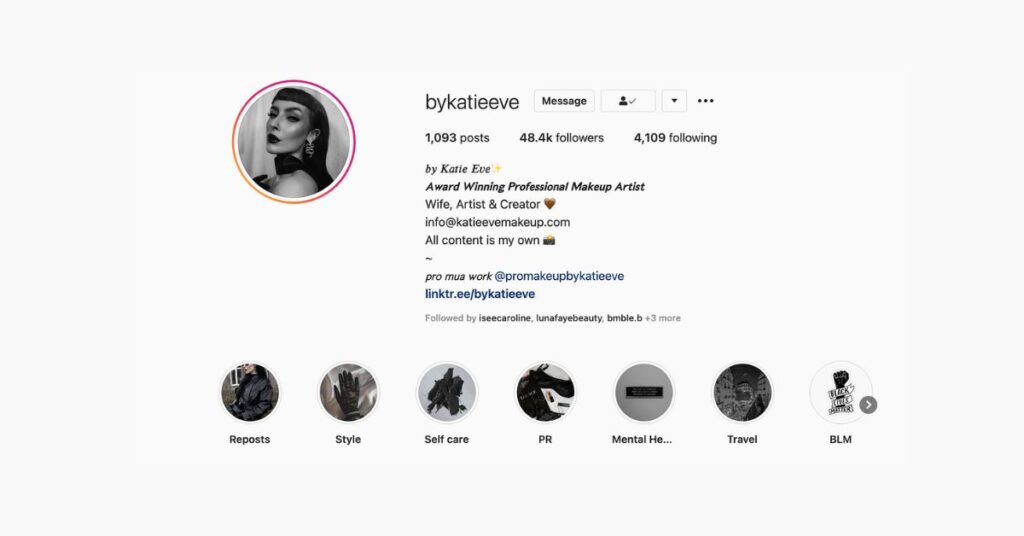
Strategic font selection significantly impacts your profile’s perceived professionalism, creativity, and brand alignment. Different typography styles convey distinct psychological impressions, making informed font choices crucial for achieving desired audience responses and engagement levels.
Bold and Italic Variations for Professional Profiles
Bold typography immediately commands attention while projecting confidence and authority, making it ideal for business accounts, executive profiles, and professional service providers. Bold fonts enhance readability in mobile environments where screen real estate limitations require maximum impact within minimal space.
Italic variations add sophistication and elegance to professional profiles without sacrificing readability or brand credibility. This typography style works particularly well for consulting firms, luxury brands, and creative agencies seeking to balance professionalism with distinctive visual identity.
Script and Cursive Fonts for Creative Accounts
Script fonts excel in creative industries where artistic expression and personal branding take precedence over corporate formality. These typography styles effectively communicate creativity, uniqueness, and personal touch, resonating strongly with audiences seeking authentic, artistic content.
Cursive variations work exceptionally well for lifestyle bloggers, fashion influencers, and artistic professionals whose brands emphasize personal connection and creative expression. However, cursive fonts require careful implementation to maintain readability across diverse viewing devices and conditions.
Monospace Fonts for Tech and Gaming Profiles
Monospace typography immediately signals technical expertise and digital proficiency, making it perfect for software developers, cybersecurity professionals, and gaming content creators. This font family’s association with programming environments creates instant credibility within tech-savvy audiences.
Gaming profiles particularly benefit from monospace fonts due to their retro aesthetic appeal and connection to classic computing environments. These fonts evoke nostalgia while projecting technical competence, creating powerful branding opportunities for gaming influencers and esports professionals.
Decorative Fonts for Lifestyle and Fashion Brands
Decorative typography offers maximum visual impact for brands prioritizing aesthetic appeal over traditional readability concerns. Fashion influencers, beauty brands, and lifestyle content creators frequently utilize decorative fonts to create memorable first impressions and reinforce brand personality.
However, decorative fonts require strategic implementation to avoid overwhelming audiences or compromising essential information accessibility. Balance decorative elements with readable content to maximize both visual impact and functional communication effectiveness.
More Post: How Do You Find Link In Bio On Instagram
FAQ’s
Can I Change Instagram Bio Font on Desktop?
Yes, desktop font customization works identically to mobile methods, utilizing the same Unicode characters, font generators, and copy-paste techniques. Instagram’s web interface fully supports custom typography implementations without requiring mobile-specific applications or procedures.
Desktop browsers often provide superior font preview capabilities and easier copy-paste operations, making desktop customization preferable for users comfortable with computer-based social media management workflows.
Are Custom Instagram Bio Fonts Against Terms of Service?
Custom fonts utilizing Unicode characters are completely compliant with Instagram’s terms of service, as they employ standardized character encoding systems rather than platform manipulation or unauthorized modifications. Unicode implementation represents legitimate use of supported character sets.
Avoid third-party applications requiring Instagram login credentials or unauthorized access permissions, as these may violate platform guidelines regardless of their font customization capabilities.
Do Instagram Bio Fonts Affect Search Visibility?
Custom fonts do not negatively impact Instagram’s search functionality or content discovery algorithms, as the platform indexes text content based on underlying character meanings rather than visual presentation. Unicode characters maintain full searchability while providing enhanced visual appeal.
However, excessive use of decorative symbols or special characters may reduce keyword density and hashtag effectiveness, requiring balanced implementation strategies that maintain both aesthetic appeal and search optimization.
How Often Should I Update My Instagram Bio Font?
Optimal update frequency depends on account type and branding consistency requirements, with most accounts benefiting from quarterly font reviews and annual major updates. Business accounts should prioritize consistency over frequent changes to maintain brand recognition and professional credibility.
Personal brands and creative accounts can experiment more freely with typography changes, using font updates to reflect evolving personal style or seasonal branding campaigns while maintaining core brand elements.
What’s the Best Font for Instagram Business Accounts?
Bold sans-serif fonts consistently perform best for business applications, providing professional appearance, excellent readability, and universal compatibility across all viewing devices and conditions. These fonts convey competence and trustworthiness while maintaining visual distinction from default typography.
Supplement primary business fonts with minimal decorative elements for contact information or call-to-action emphasis, maintaining professional standards while adding strategic visual interest that enhances engagement and conversion rates.

Passionate about crafting catchy, bold, and creative Instagram bios that make profiles stand out and spark instant connection.